
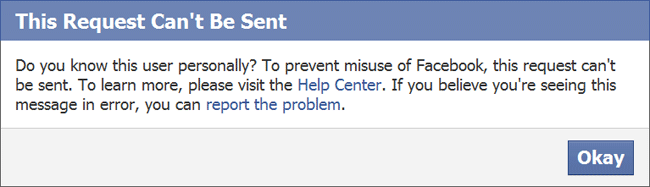
Getting blocked by Facebook from sending Friend Requests is really annoying specially when you are really in need of sending a friend request. When trying to send requests to many people whom you don't actually know or don't have any Mutual Friends, an error pops out and it says 'This Request Can't Be Sent'. So in this post we are going to fix this thing with a few tricks.

What you require for this:-
1. Firefox Web Browser
2. Tamper Data Add-On
And the most important of all
3. Facebook account and Internet connection ;)
When you see the 'This Request Can't Be Sent' or 'Do you know this user...' pop-up, press 'Okay'. Do this until you get the pop-up saying 'Send Request'. For e.g.,

You may have to try several times to get this pop-up but eventually it will come up, so just keep trying.
Now, we will assume that you have got this pop-up. So, lets begin with the actual thing. In your Firefox browser go to 'Tools' menu and under that you will find 'Tamper Data' (if you have already installed the add-on, if you don't have it here's the Link.)

Now, hit the 'Start Tamper' button. As your Tamper Data has started, its time to get back the 'Send Request' pop-up. Now, you can click on 'Send Request' button. After pressing that you will get another pop-up, and this time from 'Tamper Data'.

Hit the 'Tamper' button. Make sure that the URL that you get is similar to what you see in the pic above.

In the next step you will come across the above pop-up in which you have to do some modifications. As you can see, the highlighted option 'Submit' has the value '1' by default, you have to change it to '0' and press 'OK'
After you pressed the 'OK' button, you will be headed towards another pop-up saying 'Change content-header....' you have again press 'OK' and after you pressed this last 'OK' your Friend Request will be sent. That's all folks.
What you require for this:-
1. Firefox Web Browser
2. Tamper Data Add-On
And the most important of all
3. Facebook account and Internet connection ;)
Lets Start:
It is not necessary that you will get the error for every request you send, so just keep looking to that. If you don't get a warning pop-up that's really good but, when you see the warning pop-up go for the below step.When you see the 'This Request Can't Be Sent' or 'Do you know this user...' pop-up, press 'Okay'. Do this until you get the pop-up saying 'Send Request'. For e.g.,
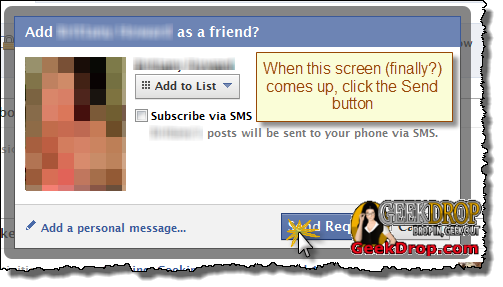
You may have to try several times to get this pop-up but eventually it will come up, so just keep trying.
Now, we will assume that you have got this pop-up. So, lets begin with the actual thing. In your Firefox browser go to 'Tools' menu and under that you will find 'Tamper Data' (if you have already installed the add-on, if you don't have it here's the Link.)
Now, hit the 'Start Tamper' button. As your Tamper Data has started, its time to get back the 'Send Request' pop-up. Now, you can click on 'Send Request' button. After pressing that you will get another pop-up, and this time from 'Tamper Data'.
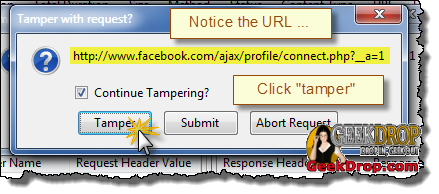
Hit the 'Tamper' button. Make sure that the URL that you get is similar to what you see in the pic above.
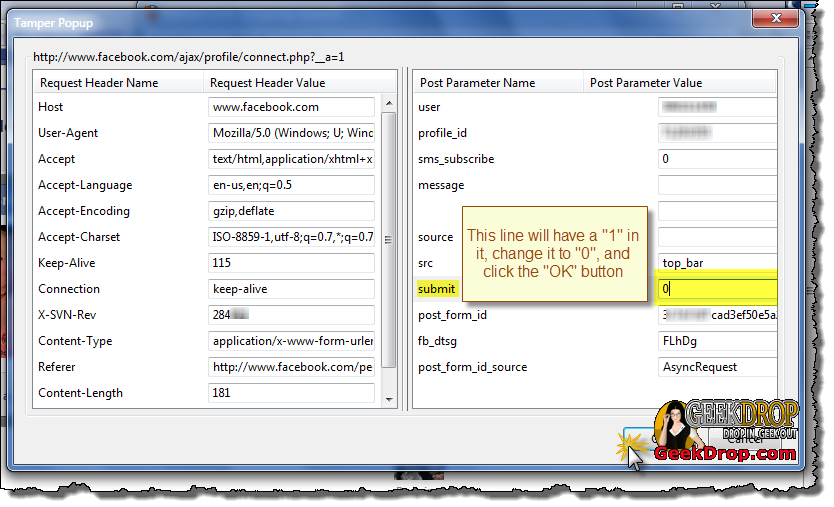
In the next step you will come across the above pop-up in which you have to do some modifications. As you can see, the highlighted option 'Submit' has the value '1' by default, you have to change it to '0' and press 'OK'
After you pressed the 'OK' button, you will be headed towards another pop-up saying 'Change content-header....' you have again press 'OK' and after you pressed this last 'OK' your Friend Request will be sent. That's all folks.

by Jillur Rahman
Jillur Rahman is a Web designers. He enjoys to make blogger templates. He always try to make modern and 3D looking Templates. You can by his templates from Themeforest.
Follow him @ Twitter | Facebook | Google Plus

No Comment